
Remove HTML Formatting in One Click
Overview
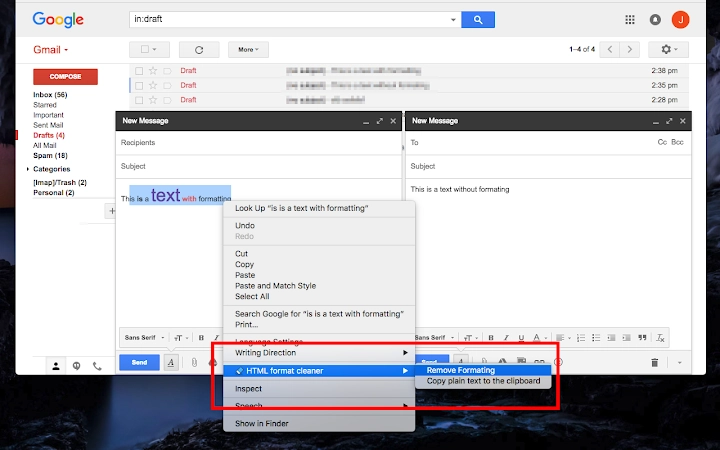
The software is a lightweight browser extension designed to streamline text handling within WYSIWYG HTML editors. It enhances productivity by adding two context-menu options directly to the right-click menu when text is selected. These options allow users to quickly remove HTML formatting from selected content and copy the plain text version to the clipboard. This functionality mirrors the "Remove formatting" feature found in Gmail, making it a familiar and efficient tool for users working with rich text environments.
It is particularly useful for professionals and content creators who frequently transfer text between platforms with varying formatting standards. The extension helps eliminate unwanted styles, tags, and metadata that often accompany copied content, ensuring clean, consistent output. By simplifying the process of sanitizing text, it reduces manual cleanup time and minimizes errors caused by embedded formatting.
Target users include web developers, writers, editors, and anyone who regularly works with HTML-based content. The tool is ideal for situations where plain text is preferred—such as entering data into forms, preparing content for publishing, or integrating text into code environments. The developer did not provide additional background information.
Key Features & Capabilities
- Remove HTML Formatting – Instantly strips all HTML tags and styling from selected text, leaving only the raw content. This is ideal when transferring text from web pages, emails, or rich text editors where formatting may interfere with the destination environment.
- Copy Plain Text to Clipboard – Copies the cleaned text without any formatting, enabling seamless integration into WYSIWYG editors, code editors, or documentation tools.
- Context-Menu Integration – Adds two intuitive options directly to the right-click menu, ensuring quick access without requiring additional steps or keyboard shortcuts.
- Universal Compatibility – Designed to work across all WYSIWYG HTML editors, regardless of the platform or browser, providing consistent behavior in diverse editing environments.
- Lightweight Design – With a file size of just 50 KB, the extension imposes minimal impact on browser performance and load times.
These features are especially valuable in workflows involving content migration, collaborative editing, or data entry. For example, copying a paragraph from a news article to a CMS or a blog editor becomes faster and more reliable. Users can avoid the common frustration of pasting formatted text that disrupts layout or styling.
User Interface, Workflow & Performance
The extension operates entirely through the browser’s context menu, ensuring a seamless and unobtrusive user experience. When text is selected, users can right-click and access two new options: “Remove HTML formatting” and “Copy plain text.” The interface is minimal, focusing solely on functionality without visual clutter.
Navigating the tool requires no setup or configuration—once installed, it is immediately available. The workflow is streamlined: select text, right-click, choose the desired action, and proceed. This reduces cognitive load and increases efficiency, especially during repetitive tasks.
Performance details were not specified by the developer. However, given the extension’s small size and focused functionality, it is expected to operate with minimal resource usage. The developer did not provide information on CPU or RAM behavior. Stability is assumed to be high due to the limited scope of operations, but real-world testing data was not included.
Compatibility & System Requirements
The extension is compatible with Windows, Mac, and Linux operating systems, ensuring broad accessibility across different user environments. It functions as a browser-based tool, meaning it does not require native installation on the host system beyond standard browser extensions.
The software version is 1.0.0, with a file size of 50 KB. The developer did not specify exact system requirements or hardware dependencies. Compatibility information was partially provided, with support confirmed for major desktop operating systems.
Users should ensure their browser supports extension installation and has the necessary permissions enabled. The extension does not require administrative privileges for installation or operation.
Pros and Cons
Pros
- Effortlessly removes HTML formatting with a single click
- Provides a plain text copy option for clean data transfer
- Intuitive context-menu integration with no learning curve
- Extremely lightweight at only 50 KB
- Works across all WYSIWYG HTML editors and platforms
Cons
- No advanced formatting options or customization available
- Functionality limited to text selection and clipboard actions
- Developer did not provide detailed documentation or support channels
- Performance metrics were not disclosed
FAQ Section
Is this extension compatible with all browsers?
The extension is designed to work on browsers that support extensions, though specific browser compatibility was not detailed by the developer. It is recommended to check the browser’s extension store for compatibility.
Is the software safe to use?
As a browser extension with a small file size and no reported security issues, it is considered safe for general use. However, users should only install extensions from trusted sources and review permissions before granting access.
How often are updates released?
The developer has not specified an update schedule. The current version is 1.0.0, and no information was provided about future releases or maintenance plans.
Does it require an internet connection to work?
The extension functions offline after installation. It operates locally within the browser, processing selected text without requiring a continuous internet connection.
Can I use this tool on multiple devices?
Yes, the extension can be installed on multiple devices as long as they support browser extensions and the user has access to the same browser account or extension store.
Final Thoughts
This browser extension delivers a focused, efficient solution for users dealing with messy, formatted text in HTML environments. Its ability to remove HTML formatting and copy plain text with a single right-click makes it a valuable tool for content creators, developers, and editors who prioritize clean, consistent output. Despite its minimal feature set, the extension excels in simplicity and reliability.
While it lacks advanced customization and detailed documentation, its lightweight nature and seamless integration make it a practical addition to any productivity toolkit. The free pricing model further enhances its appeal, offering robust functionality at no cost.
For professionals who frequently copy and paste text between platforms, this tool eliminates a common pain point. Download {software_name} now.







